
Buying a computer as a senior doesn’t have to be daunting, even though it can feel that way. There’s always someone trying to sell you something you don’t need, and a very real fear of ending up with a computer you don’t understand how to use. As someone who teaches seniors how to use computers every week at our Lithgow shop, here’s what actually matters when you’re buying one.
We won’t be talking about hardware specs like RAM or hard drive size here, mostly because that kind of information changes constantly and there’s already plenty written about computer hardware elsewhere. Instead, I want to focus on the parts that actually stress seniors out when buying a computer.
Know How You Plan to Use It
Every senior who walks into our shop wanting a new computer starts with the same line: “I just want to do the basics, nothing special, no video games.” That’s a perfectly good starting point, but plenty of people end up wanting more than that. Telling us how you actually plan to use your computer is what helps us get you the right one, and none of these questions require you to be a computer expert:

- Do you have a lot of old photos or movies you want to store?
- Do you want your photos saved online, or is the computer itself enough?
- Do you still need a DVD player?
- Will it sit on a desk, or do you need to move it around the house?
- Does it need to work well with your phone and tablet?
Laptop, Desktop, or Mini PC? It Matters Less Than You Think
This is one of the more stressful parts of computer shopping for seniors. When we show someone a Mini PC, they often panic, simply because it looks unfamiliar. Below are three screens. Can you tell me which one is the laptop, which is the desktop, and which is the Mini PC?
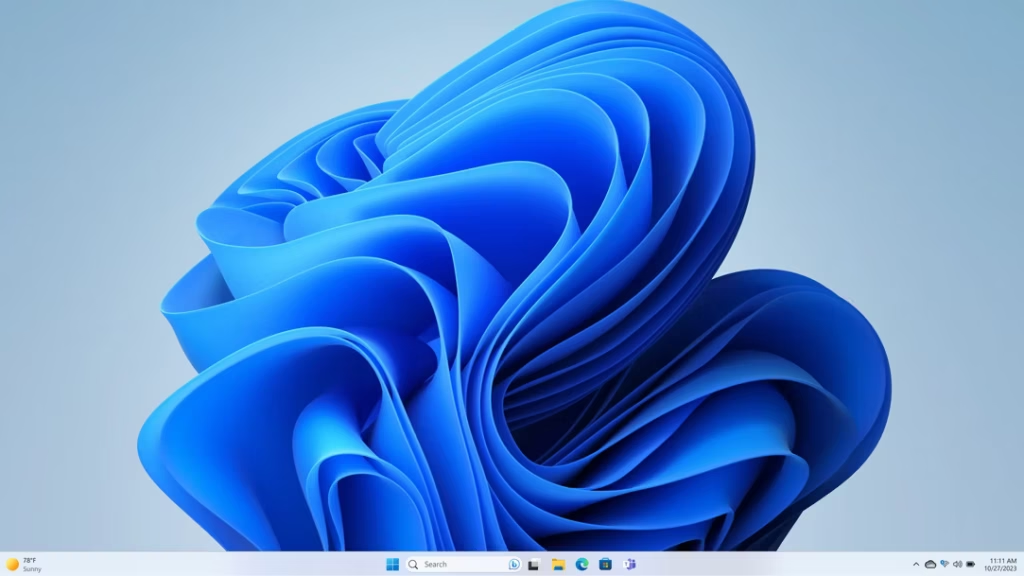
Here’s the trick: there’s no difference, because I used the same image three times. If we plugged a laptop, a desktop and a Mini PC into the same external monitor, you’d need to be genuinely tech-savvy to tell them apart. The screen looks the same either way, so pick the shape that suits your desk and how much you need to move it, not the label on the box.
Watch Out for the Add-Ons
I’ll be honest, there isn’t a lot of margin in computer sales, we don’t make much money on the computer itself. At one company I worked for, we made as little as $50 per computer sold unless extras were added on. So the question worth asking is: do you actually need the extras?

Do seniors need antivirus software? Not necessarily. Every computer that’s come through our shop with a scam-related problem already had antivirus installed, it didn’t stop the scam, and in some cases the antivirus itself was causing the trouble. At this point, I generally wouldn’t recommend paid antivirus for a senior.
Do you need another Microsoft account? Almost certainly not. This one genuinely frustrates me. Salespeople often have quotas to fill, and signing you up for another Microsoft 365 subscription is an easy way to hit one, even though they don’t have to deal with the mess it causes later. Over the years, one client of ours ended up with four separate Microsoft 365 accounts from buying laptops at a major Australian tech store. When she got locked out of one, she had no idea which account was tied to which phone and email. It took real work to untangle.
If you already have a Microsoft account, you don’t need a new one when you buy a new computer. Don’t let a salesperson pressure you into signing up for another. We don’t sell Microsoft 365 subscriptions at all, so there’s no pressure from us either way.
Computers Don’t Come With Different Software Anymore
Back in the day, computers came with different software pre-installed depending on the brand, sometimes Office, sometimes something else. These days they’re all much the same: Microsoft Office doesn’t come pre-installed on any new computer, regardless of where you buy it.
You Can’t Buy Windows 7, 8, or 10 Anymore, It’s Windows 11 Only
I get it, you know Windows 7 or Windows 10, and you know how it works, so naturally you’d want your next computer to be the same. Unfortunately, Microsoft now requires every new computer to ship with Windows 11, and there are no exceptions.
There’s No “Easy” Version of Windows
We hear this all the time: people want Windows, but without anything complicated. Here’s the truth. Every computer running Windows works exactly the same way, there’s no simplified edition. The good news is that each new version actually gets a little easier to use than the last. When I started out, you needed to be a genuine computer expert to do almost anything. These days, kids who can’t even read yet can connect to Wi-Fi, not because they’re geniuses, but because they’re not afraid to press a button and see what happens. And the reassuring part is that it takes a lot to break a computer just by clicking around. No matter what you buy, there will always be a little bit to learn, and that’s normal, not a sign you did something wrong.
How We’re a Different Kind of Computer Store
The first thing you’ll notice is that we won’t try to sell you anything you don’t need. Because we order our stock rather than keeping a shelf full of it, there’s no pressure to move a computer just because it’s been gathering dust.
We also offer a few things seniors tend to appreciate:
- We can move your data over to your new computer (starting at $150)
- We can teach you how to use your new computer (there’s a good chance you already know, but the option’s there)
- We don’t sell antivirus subscriptions or Microsoft accounts
- We’d rather sell you the right computer than something you’ll regret, whether that’s because you were oversold or sold something cheap just to get you out the door
And if you’re one of those seniors who isn’t afraid of tech and wants something more powerful, for gaming or a digital art project, we can help with that too.
If you’re in Lithgow or anywhere around the Blue Mountains and want to talk through what actually suits you, drop by the shop at 85 Main Street, Lithgow, or get in touch through our contact page. If scams and remote-access tricks worry you more than which box to buy, our guide to a scam-resistant computer for seniors covers that side of things, and our Mini PC and NUC guide goes deeper on the small-form-factor option mentioned above. We also run regular senior tech classes and one-on-one help through the Monkey Bar Help Desk if you’d rather learn hands-on than read about it.
Frequently Asked Questions
What’s the best type of computer for a senior: laptop, desktop, or Mini PC?
Whichever fits your space and habits. A laptop, desktop and Mini PC display and work identically once connected to a monitor. Choose based on whether you need to move it around, how much desk space you have, and what you already know, not the shape of the box.
Do seniors need antivirus software?
Not necessarily. Antivirus doesn’t stop most scams, many of the scam cases we see involved computers that already had it installed, and it can sometimes cause more problems than it solves. We generally don’t recommend paid antivirus for senior customers.
Can I still buy a new computer with Windows 10?
No. Microsoft now requires all new computers to ship with Windows 11, with no exceptions, so Windows 7, 8 and 10 are no longer available on new machines.
Does a new computer come with Microsoft Office?
No. Microsoft Office no longer comes pre-installed on new computers from any manufacturer. If you already have a Microsoft account from a previous computer, you can keep using it rather than creating a new one.
Where can seniors get help buying a computer in Lithgow?
LithGeek, at 85 Main Street, Lithgow, offers computer sales, senior tech classes and one-on-one help through the Monkey Bar Help Desk, with no pressure to buy extras you don’t need.